
(TLDR at the bottom)
I was fascinated by how Dark Souls and the like seem to have crazy complex calculations for damage values. It starts off simple by a certain value for weapons but becomes very complex as certain resistances are subtracted, buffs are added, armor defenses are subtracted and so on and on. These are probably complex scripts with a seemingly endless amount of calculations and “if”s. Which I didn’t want to do. Instead, I had the idea to make this visually editable as a node-based graph.
General Architecture
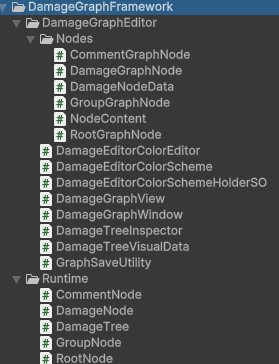
I will not go into a lot of detail about each script because there are way too many as you can see on the right (or bottom on mobile?). In general, it’s split into editor- and runtime-components. You can see how each node has a graphnode and a corresponding node for the runtime behaviour.
Editor
At the heart of the editor lies the DamageGraphWindow which inherits from EditorWindow and the DamageGraphView which inherits from GraphView. This GraphView is the main component that allows you to work with a node-based graph. Each node can have an input and multiple output ports. Setting all of this up can take a lot of scripts and a lot of UI related coding (using VisualElements). But eventually, you can have an editor that looks close to this:
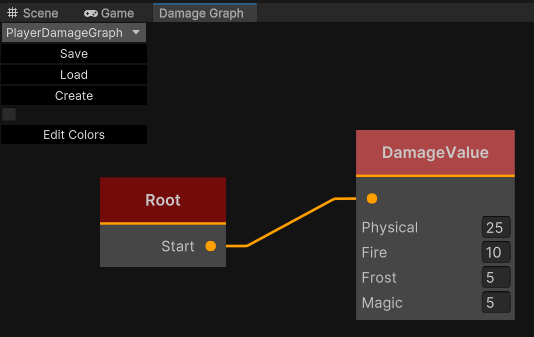
Obviously, eventually there should be more nodes. But at the moment, it’s enough to have values you can fill out. Later, I want to make nodes that do calculations based on armor, buffs, etc.
Storing the Data
All nodes, their values and connections are stored in a single ScriptableObject called DamageContainer, which looks like this.

There’s a GUID for every single node which is also used to store the connections by storing child GUIDs. The content is stored as a JSON string.
Runtime Behaviour
The runtime tree references exactly that same ScriptableObject and builds its own internal nodesystem (which is of course purely in memory, there is no “visual” tree).
There is always only one “Root” node allowed. This is where the tree starts and it simply goes through all the nodes and gets its damage value that way. You can imagine a node that splits depending on whether the weapon is held in one hand or both hands.
Conclusion
This is definitely one of the more complex tools I have made. A lot of things happen in the background that are not visible. For example, saving and loading states depending on the editor state, registering all kinds of mouse events to make rightclicks possible and selections, making two color schemes possible.
It’s also one of the more interesting ones. I see a lot of potential for such a node based graph system for a lot of different use cases. The only thing left to do is to create more nodes.
TLDR
I’ve created a tool to edit damage outputs visually as a nodebased graph. It’s a work in progress, so currently there are not many nodes, but I see a lot of potential to make damage calculations visually editable, but also a lot of potential for other node-based tools.
 My Shelf of Stuff